
IMPORTANT: You need to be an ADMINISTRATOR user in the App Store Connect account to perform this process.
1. Access App Store Connect
-
Log in with your Apple ID at: https://appstoreconnect.apple.com.
2. Go to "Users and Access"
-
In the top menu, click on “Users and Access”.
-
Access the “Keys” tab.
-
Click the “+” button to add a new API key.
3. Create your API key
-
Give the key a descriptive name.
-
Under Access, select the “Administrator” permission level.
-
Click “Save”.
4. Download and copy the information
-
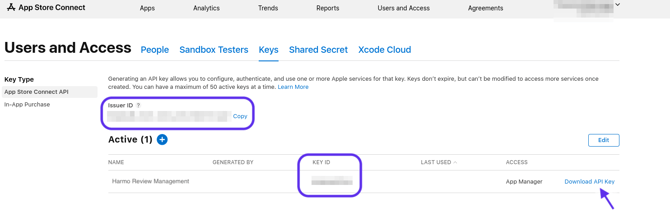
After saving, download the key in .p8 format (keep this file securely).
-
Also copy the following data:
-
Key ID
-
Issuer ID (available above the keys table)
-
5. Send the information to Harmo
-
Send the three items below:
-
.p8 file of the key;
-
Key ID;
-
Issuer ID.
-
With this, Harmo will integrate with your App Store account.
6. Step-by-step guide
-
Access App Store Connect with your Apple ID. App Store Connect
-
Go to Users and Access and click on the Keys tab.
-
Click the “+” button to create a new API key.

-
Give the key a name and select administrator access.
-
After saving, download the .p8 file, copy the Key ID and the Issuer ID (available above the table).